https://www.youtube.com/watch?v=y4a0X7dS2q8&list=PL93mKxaRDidECgjOBjPgI3Dyo8ka6Ilqm&index=46
43강~
DB 격리수준
부정합
repeatable read
자기 트랜잭션보다 낮은 undo 로그르 보고 select
@Transactional 정합성 유지
select를 할 때도 붙임.
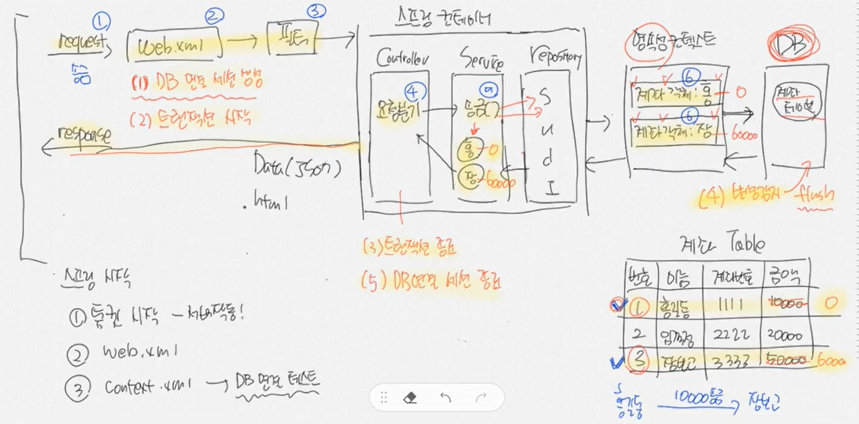
스프링 시작
1.톰캣 시작 - 서버 작동
2. web.xml
3. context.xml -> DB 연결 테스트

EAGER, LAZY
스프링부트의 트랜잭션
- 세션의 시작은 서블릿이 시작되는 시점 부터~ (세션은 영속성 컨텍스트를 포함)
- 트랜잭션의 시작은 서비스 레이어부터, JDBC 커넥션도 이 시점부터.
- 트랜잭션의 종료는 서비스 계층에서 종료, JDBC 커넥션도 이 시점 부터 종료.
- 세션은 컨트롤러 영역까지 끌고 가기 때문에 영속성이 보장되어 select가 가능해지고 lazy-loading이 가능해진다.
JSTL tutorial
https://www.tutorialspoint.com/jsp/jsp_standard_tag_library.htm
-스프링 시큐리티
spring security taglib

https://www.baeldung.com/spring-security-taglibs
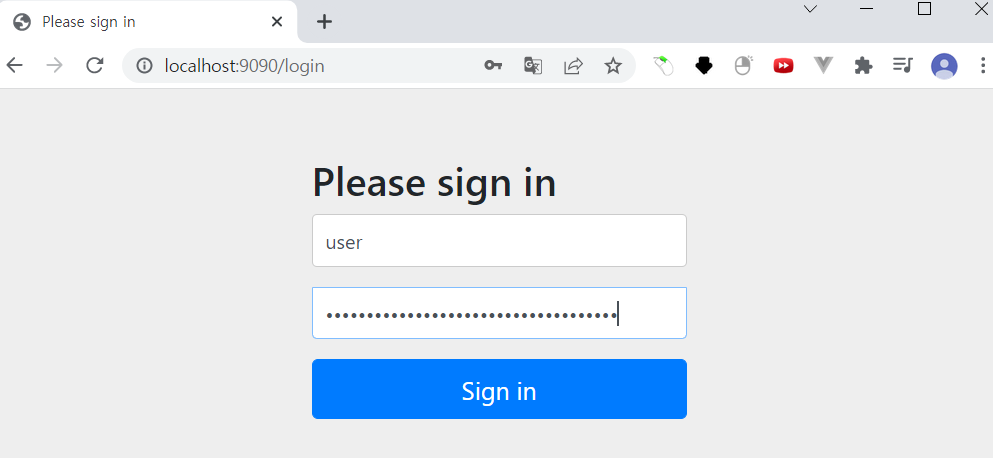
스프링 시큐리티를 이용하면 sign in 로그인 창이 뜬다.
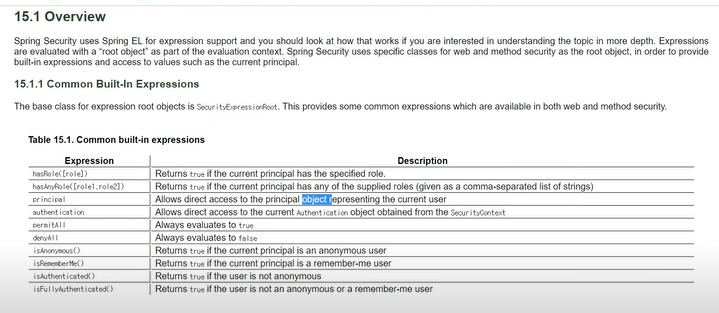
<sec:authorize access="isAuthenticated()">
    <sec:authentication property="principal" var="principal"></sec:authentication>
</sec:authorize>
인증되었다면 값에 principal을 넣어주어
principal값이 비어있다면 로그인, 회원가입이 뜨고 그렇지 않다면 로그아웃 버튼이 뜸.
<c:when test="${empty principal}">
    <ul class="navbar-nav">
        <li class="nav-item">
            <a class="nav-link" href="/loginForm">로그인</a>
        </li>
        <li class="nav-item">
            <a class="nav-link" href="/joinForm">회원가입</a>
        </li>
    </ul>
</c:when>
<c:otherwise>
</c:otherwise>
principal의 값은 다음과 같다.
org.springframework.security.core.userdetails.User [Username=user, Password=[PROTECTED], Enabled=true, AccountNonExpired=true, credentialsNonExpired=true, AccountNonLocked=true, Granted Authorities=[]]
Username: user,
Password: 보호되고 있음 [protected],
//빈 등록: 스프링 컨테이너에서 객체를 관리할 수 있게 하는 것

@Configuration // 빈 등록(IoC관리)
@EnableWebSecurity // 시큐리티 필터 등록 = 스프링 시큐리티가 활성화가 되어있는데 어떤 설정을 해당 파일에서 하겠다.
@EnableGlobalMethodSecurity(prePostEnabled = true) //특정 주소로 접근을 하면 권한 및 인증을 미리 체크하겠다는 뜻.
public class SecurityConfig extends WebSecurityConfigurerAdapter {

    @Override
    protected void configure(HttpSecurity http) throws Exception {
        http
                .authorizeRequests()
                .antMatchers("/auth/**")// "/auth/loginForm", "/auth/joinForm"
                .permitAll()
                .anyRequest()
                .authenticated() //접근제한
                .and()
                .formLogin()
                .loginPage("/auth/loginForm"); //커스터마이징한 페이지로 이동
    }
}
-비밀번호 해쉬화
//    @Autowired
	private BCryptPasswordEncoder encoder;

@Transactional
    public void 회원가입(User user) {
        String rawPassword = user.getPassword(); //1234 원문
        String encPassword = encoder.encode(rawPassword); //해쉬
        user.setPassword(encPassword);
        user.setRole(RoleType.USER);
        userRepository.save(user);
    }
encode를 통해 입력받은 비밀번호를 해쉬화함.

비밀번호가 인코딩되어 들어간 것을 알 수 있음.
XSS 자바스크립트 공격
naver 오픈소스 lucy filter
CSRF 토큰
@Controller
public class BoardController {

    @GetMapping({"", "/"})
    public String index(@AuthenticationPrincipal PrincipalDetail principal) {
        // /WEB-INF/views/joinForm.jsp
        System.out.println("로그인 사용자 아이디: "+principal.getUsername());
        return "index";
    }
}
summer note
55강
글목록 페이징
https://www.w3schools.com/bootstrap4/bootstrap_pagination.asp
justify-content-start
justify-content-center
justify-content-end
d-flex
글 상세보기, 삭제
'Spring Boot > 인강' 카테고리의 다른 글
| Springboot-나만의 블로그 만들기 4 (0) | 2022.03.21 |
|---|---|
| Springboot-나만의 블로그 만들기 2 (0) | 2022.03.12 |
| Springboot-나만의 블로그 만들기 (0) | 2022.03.10 |
| 스프링 IoC, IoC 컨테이너, Bean, DI, AOP (0) | 2022.03.08 |
| 스프링 부트 (0) | 2022.03.06 |


댓글